
Open an investigation to review what Driver found and the sources behind the explanation. The conversation records your questions, Driver’s responses, and the context you provide.
Investigation report
For support ticket investigations, open Investigation report to read the current findings. Use the Report tab for the findings and request a draft when you need to communicate them.
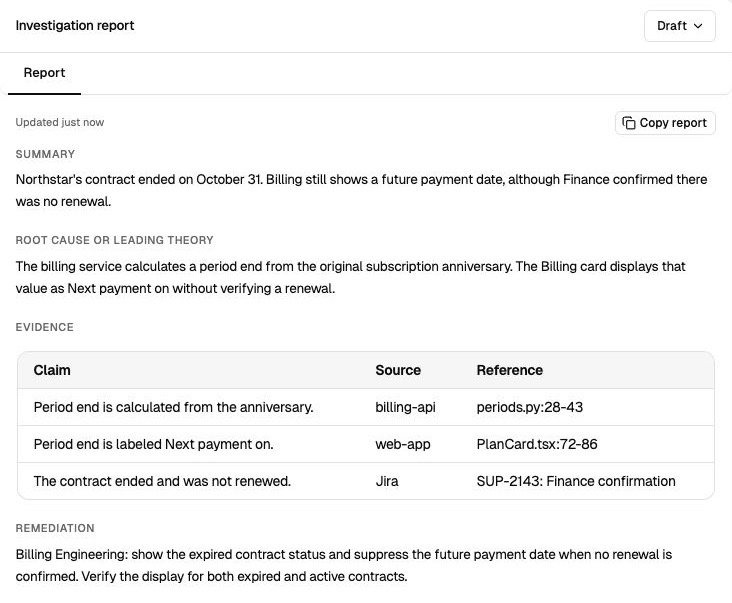
Check the explanation, source evidence, and proposed remediation. View full size.
| Part | What to check |
|---|---|
| Finding | The explanation or likely cause and the behavior it accounts for. |
| Evidence | The code, commits, ticket details, documentation, or supplied records supporting the explanation. Open the cited source and check its version and context. |
| Hypotheses | Other explanations that could fit and the evidence needed to distinguish them. |
| Open questions | Missing information, such as the environment, a reproduction, or the relevant log window. |
| Next step | A concrete check, workaround, or engineering task supported by the findings. |
In Answers, the response and its source citations appear directly in the conversation.
Confidence
Assess how well the evidence supports the conclusion. A matching code path, reproduction, error event, or commit is stronger than an explanation based only on a symptom. Check any stated confidence against those sources.
When evidence is missing or two causes fit, ask Driver what would distinguish them. For example: “Does this code run in version 4.2.1, and what log message would confirm it?”
Continue the conversation
Ask a follow-up to add a fact, inspect another path, or narrow the investigation. Earlier messages remain in the conversation so you can see the context behind the answer.
An automated Jira report is a Shared starting point. Sending a message starts your own private continuation; private conversations do not update that shared report. See Continue a Jira investigation.
Drafts
For a ticket investigation with a report, request an Internal note, Engineering handoff, or Customer reply. The draft opens in a named tab beside the report. Review and copy it into Jira or another tool. See Review drafts.
Feedback and closing
Rate an investigation as Right, Partially right, Wrong, or Didn’t use it and add a short explanation. In Answers, rate how well the response addressed your question. Feedback records your assessment; it does not resolve the Jira ticket.
For your own support ticket investigation, use Close investigation when you are done and Reopen to resume. The common automated starting point and conversations in Answers have different controls, so those actions may not appear there.