
Turn on Automatic triage for a connected Jira project to investigate tickets created after the setting is enabled. Driver posts the automated findings on the ticket with a link to continue in Driver.
Automatic Jira investigations are available on plans above Free, including during their trials. The Free plan does not include automatic Jira investigations.
Enable automatic investigations
- Open Settings > Integrations > Jira Cloud.
- Under Project Scopes, add the project if needed, then click its name to open Project scope configuration.
- Turn on Automatic triage.
- Create a new Jira ticket with enough information to describe the problem, then check Driver’s automated report on that ticket.
The control is on or off. It applies to ticket creation after it is enabled. A project configured to investigate new tickets does not backfill every existing ticket when you turn it on.
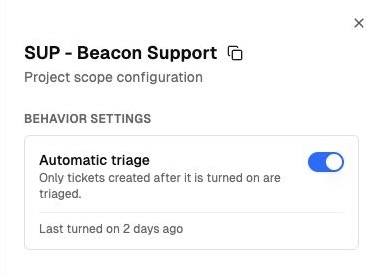
Enable Automatic triage to investigate newly created tickets in this project. View full size.
What is posted
The automated Jira report summarizes the findings and likely cause and links to Continue investigation in Driver. Review the evidence before using a likely cause as a confirmed diagnosis.
Choose report sections
Administrators can choose which sections the automated Jira report includes:
| Section | What it provides |
|---|---|
| Summary | An overview of the issue and investigation findings. |
| Likely cause | The explanation the evidence points to. |
| SOPs | Relevant standard operating procedures for handling the issue. |
| Related tickets | Other tickets relevant to the reported problem. |
| Likely routing team | The team most likely to handle the issue. |
Choose the sections your team needs when reviewing the automated findings. The likely routing team is a recommendation for your team’s ticket workflow.
Each person who continues starts a private conversation from the automated starting point. Copy reviewed information that teammates need into Jira through your normal ticket workflow.
Turn automatic investigations off
Open the same project configuration and turn Automatic triage off. This stops new tickets from starting automatic investigations for that project. People can still investigate a ticket directly by pasting its URL into Driver.
See Automation controls for the administration overview.