
Changelog
& Updates
Sep 11, 2026
A Rebuilt Context Compiler, Atlas, Relationship Context, and the MCP Tool Migration
Driver’s context compiler has been rebuilt. Onboarding a codebase now costs about 90% less and runs nearly 5x faster, and keeping that context current as commits land costs roughly half what it did. The rebuild also changes what the compiler produces, which introduces four new MCP tools and starts a migration off six older ones.
A rebuilt context compiler
The compiler now builds understanding from a graph of typed relationship edges between files. Each edge names the symbols involved and records how the relationship was found: language-specialized parsers, exhaustive literal search, value-set matching that pairs an enum in one language with its mirror in another, and git co-change history. Most of this processing touches no language model at all, which is where the cost reduction comes from.
Because the relationships are typed rather than prose, they aggregate cleanly from files to folders to the whole codebase. That is what makes the new context levels possible.
Atlas
get_atlas_index returns a thematic map of a codebase organized by what its subsystems do, rather than by directory. Sections group code that works together even when it lives in different trees. get_atlas_detail opens any section the index advertises, giving you that section’s narrative, its coupling rules, and its member files.
The pattern is orient first, then drill in. Ask the index where something lives, then open only the section you need. The index takes a token budget and adapts: a generous budget lists every section flat, a smaller one folds them into groups that link onward.
get_atlas_detail also works in reverse. Pass a repo-relative file path instead of a section route and it tells you which sections own that file, which is the fastest way to place an unfamiliar file in its architectural neighborhood.
Relationship context for any file or directory
get_related returns precomputed connectivity for a path: dependency, mirror, and co-change edges, each with a coupling verdict, plus type-membership groups. Point it at a directory and it also returns a narration of how the subtrees inside it couple to each other and to the rest of the codebase.
An empty result is a real answer. It means no precomputed connectivity exists for that path, not that the path is missing.
A new context agent
request_context and poll_context replace the earlier task-context tools. Submit a task description and the codebases it touches, hold the returned request ID, then poll until the brief is ready. Runs typically take one to three minutes.
This is a different agent, not a rename. It starts from the Atlas index and follows precomputed relationship and change-impact edges, where the previous agent read architecture documents and navigated code structure.
Request IDs are not interchangeable between the old and new tools. An ID from request_task_context cannot be polled with poll_context.
Deprecations
Six tools are now deprecated. They continue to work today.
gather_task_context,request_task_context, andpoll_task_contextare replaced byrequest_contextandpoll_context.get_architecture_overviewandget_llm_onboarding_guideare replaced byget_atlas_indexandget_atlas_detail.get_file_documentationkeeps returning a file’s purpose, and its richer symbol documentation is replaced byget_relatedfor relationships,change_impactfor a symbol’s blast radius, andget_source_fileorgrep_sourcefor exact implementation.
Action required: If a script, prompt, agent skill, or integration names any of these tools directly, or parses the richer get_file_documentation payload, update it by September 30, 2026. We plan to remove the deprecated tools on October 1, 2026. Agents that discover tools dynamically adapt on their own and need no change. If you need longer, contact your Driver account team.
If you pasted Driver’s agent instructions into AGENTS.md, CLAUDE.md, or a Cursor rules file, the template on Agent Instructions now covers the new tools. Ask your agent to read that page, apply the differences to your file, and show you the diff for review. An agent does this well: it can check every tool name in your file against the current reference and rewrite the surrounding guidance to match.
Under the Hood
- Relationship edges now record their provenance and the limits of the method that found them, so context can say how a connection was established.
- Atlas pages carry coverage accounting, so a thin page is distinguishable from an absent one.
Aug 14, 2026
Bring Your Own Model, Code Search MCP Tools, Symbol-Based MCP Tools (Early Access)
This release lets customers run Driver on their own model credentials, adds code search and file discovery to the MCP toolkit, opens early access to symbol-level MCP tools, and sharpens ticket analysis.
Bring Your Own Model
Driver can now run on your organization’s own model credentials instead of Driver’s, so token costs run against your provider bill and commitments. Supported providers are OpenAI, Anthropic, Azure OpenAI, and any LiteLLM-compatible gateway, which covers reaching a provider Driver does not list directly.
Set a max budget, a budget period, and requests and tokens per minute ceilings across every call your organization makes.
Contact us to get set up. See Bring Your Own Model for the full configuration reference.
Code Search MCP Tools
Driver’s MCP server now exposes two tools for working directly with a codebase’s files. grep_source runs a regular expression across the source and returns matching lines with the surrounding context, the files it searched, and how much of the codebase it covered. glob_files finds files by path pattern and returns their paths.
These cover the cases of pinning down an exact string, identifier, or config key. Gather Task Context uses the same search internally, so it now combines compiled context with a direct text search on tasks that need a literal match. See MCP Tools for both parameter references.
Symbol-Based MCP Tools (Early Access)
Driver now has a change_impact MCP tool: give it a symbol name and it reports structured dependency graph and relationship information for that symbol, from deterministic syntax tree computations. It is useful generally and for understanding the “blast radius” of changing a symbol, with results grouped by file and per-file counts that sum to the total so an agent can confirm it saw everything. Coverage follows Driver’s static analysis and is available for Python, Java, JavaScript/TypeScript, C#, and Rust, with support for more languages coming soon.
This is available in early access. Contact us to enable it for your organization and to confirm coverage for your languages. See MCP Tools for the parameter reference.
Under the Hood
- Driver’s MCP tools now declare
readOnlyHint, so MCP clients that gate on read-only tools can see and use Driver. - Ticket Analysis now resolves codebases more precisely, reads custom ticket fields, honors directive
@drivercomments, and can run on a per-organization model choice.
Jul 23, 2026
Non-Blocking Context: Submit and Poll
Gathering deep context now works without holding a connection open: agents can submit a request, keep working, and poll for the result until it is ready.
Context that doesn’t block your agents
Gathering deep context can take one to three minutes. Until now that meant holding a single HTTP connection open for the whole run, and one network blip could lose the entire request. This release splits the work into a non-blocking pair of MCP tools so agents can fire a request, do other work, and check back on a schedule.
request_task_context(task_description, codebases)validates the scope, dispatches the context request, and returns arequest_idimmediately.poll_task_context(request_id)returns the current status (QUEUED,RUNNING), the finished result once it’s ready (COMPLETED, with the gathered context), or a clear error. Polling while a request is still running returns promptly instead of blocking.
Why it matters: agents can submit several context requests in parallel, continue with other work, and collect results as they land. That means less time spent waiting on a single call, fewer requests lost to transient network issues, and better use of every turn.
No breaking changes
The original gather_task_context tool is unchanged and continues to work exactly as before. It is now marked deprecated and points to the new submit-and-poll pair, so you can migrate on your own timeline. Removal will follow in a later release.
Jul 16, 2026
Deeper Context from Static Analysis
Richer context from static analysis: Driver now surfaces the connections between the parts of your codebase, exposed through a new get_related MCP tool.
Richer connections within your code
Until now, Driver compiled exhaustive context about each part of your codebase but did not expose the relationships between those parts at all levels of granularity. This release introduces get_related, a new MCP tool that returns, for any file, symbol, or folder: dependency edges with the kind of connection and a confidence band, git co-change couplings (files that tend to change together, often invisible to text search and able to surface dependencies that cross language boundaries), and folder-level narration. It is also wired into the Gather Task Context flow, so gathered context now includes static-analysis guidance where a task calls for it. This is the first time Driver surfaces its symbol-table relationships directly.
Instead of only telling agents that “function A uses function B,” Driver now delivers the kind of use (a method call, a constructor, a super() delegation, a property read versus a write), how confident it is that the reference resolved, and the types flowing in and out. Driver now builds a full type-aware symbol table and synthesizes types even where the code carries no annotations. Driver deliver these as structured, machine-readable data (typed edges, confidence bands, and explicit relationship kinds), the form agents parse most reliably.
Why it matters: the payoff is precision. The context Driver hands to an agent describes real signatures, real data flow, and real architecture instead of inferring from raw syntax. In our own evaluation, cross-validated coupling data rose sharply and complete typed inheritance maps came back in a single fetch. That means agents miss less and hallucinate fewer dependencies.
You don’t have to change anything to use this deeper context. Driver will automatically produce improved context as your code is analyzed and serve it to your coding agents. Our enhanced context substrate launches today for Python, Javascript, Typescript, Java, and Rust, with support for more programming languages rolling out progressively over the coming weeks.
Coming soon
- More context improvements and agent steering docs from deep static analysis across programming languages
- Details on our context measurement methodology, with ways to improve context through agent feedback
Jun 25, 2026
Branch Visibility, Smarter Task Context, Ticket Analysis Enhancements, and Gerrit Support
This release surfaces branch-level activity in My Sources, adds per-codebase branch controls, sharpens the Gather Task Context MCP tool, expands Ticket Analysis, and adds Gerrit as a supported git provider.
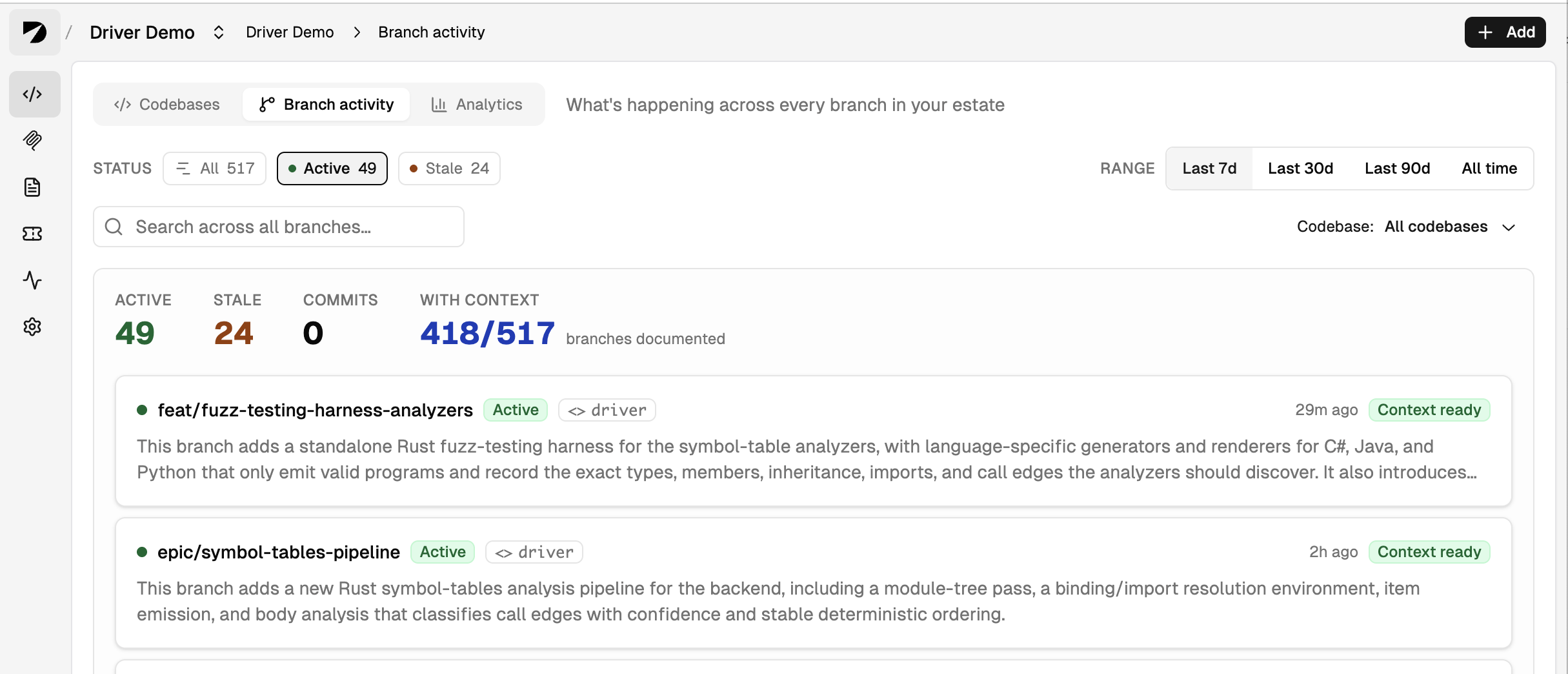
See what’s happening across every branch in My Sources
Driver now surfaces descriptions for the active work on every indexed branch, directly in My Sources. Filter by codebase or time to see what your team is building at a glance. Each source detail page now includes a Branch activity tab (branch names, descriptions, and status) alongside an Analytics tab showing commit patterns, contributor activity, and branch dynamics for source and org admins.
Multi-branch has been tracking your entire estate. Now that understanding is visible to your whole team, not just AI agents.
Branch Controls
New per-codebase admin controls let you define exactly which branches Driver indexes. Two modes:
- Update all branches, with exceptions: Driver tracks every branch by default; add exception patterns for the ones to skip (e.g.
hotfix/*,archive/*,wip/*) - Update only specific branches: specify the patterns Driver should track (e.g.
feature/*,release/*); everything else is ignored
Regex patterns, enforced at the webhook level across GitHub, GitLab, Bitbucket, and Azure DevOps. Keep Driver focused on the branches that matter; stop spending tokens on the ones that don’t.
Smarter context from Gather Task Context
The Gather Task Context MCP tool now concretely maps the files, folders, and symbols relevant to your task, including non-obvious connections between components and clear explanations of why certain components must change together. The result: agents miss less and have a specific, reasoned map of what to read next and why.
Ticket Analysis: @mentions, smarter re-analysis, live state, and Linear support
Driver can automatically analyze support tickets using the context of your codebases. Now supported for Jira and Linear. This release adds four improvements to how Driver handles ticket analysis:
@driver mentions trigger analysis in Linear and Jira. Mention @driver in any ticket comment to get a fresh codebase-grounded analysis on demand at any point in a ticket’s lifecycle.
No more anchoring on past analysis. Driver no longer includes its own prior comments in the re-analysis context. Each run is grounded in the current ticket state and codebase, not in what Driver concluded last time.
Live ticket state tracking. Status, priority, and assignment changes are now captured in real time from webhooks. The state you see in Driver always reflects what’s actually happening in your tickets.
Automation for Jira support. Ticket Analysis now works with Automation for Jira. Automations can comment with an @driver mention to trigger analysis based on the events and rules that fit your team’s workflow.
To enable Ticket Analysis, visit Labs and enable the feature, then configure Linear or Jira in Settings → Integrations.
Gerrit Support
Driver now supports Gerrit as a connected git provider, alongside GitHub, GitLab, Bitbucket, and Azure DevOps. To install, visit Settings → Integrations.
Usage Visibility for All Users
Every user can now see their own MCP tool usage directly in Driver, including calls made, tools used, and activity over time. Previously available to admins only.
Under the Hood
- Context documents now update incrementally on every commit and do a full deep refresh weekly, preventing doc drift without waiting for a full rebuild after every push.
- Updates to core pipeline models for better code-level context at a lower cost.
Coming Soon
We’ve been hard at work measuring context impact and building new context enhancements. Coming soon: improvements from static analysis that sharpen Driver context for complex codebases.
May 21, 2026
Personal Access Tokens, Self-Service SSO & SCIM, Claude Code Plugin Update
This release adds personal access tokens for scripted access, brings SSO and SCIM setup into the Driver web app, and ships improvements for Claude Code.
Personal Access Tokens
Personal access tokens (PATs) authenticate to Driver’s API and MCP server as you — useful for scripts, CLI workflows, and any environment that can’t open a browser for OAuth.
- Self-service creation — Any organization member can create a PAT under Settings → Access Tokens. Tokens use the
drvp_prefix and are shown exactly once. - Bounded expiration — Choose 30, 90, 180, or 365 days at creation. Email reminders go out as the expiration date approaches and once a token has expired.
- Administrator controls — Settings → Organization has a new Personal Access Tokens section where org admins toggle PATs on or off for the org and cap the maximum token expiration.
- Coexists with OAuth — Standard browser-based login is unchanged; PATs are an additional auth path, not a replacement.
See the new Personal Access Tokens docs for setup and configuration examples.
Settings → Machines has moved to Settings → Access Tokens as the Machines tab, so personal and machine credentials now live in one place.
Action required: Org admins must enable personal access tokens for their organization at Settings → Organization before members can create them.
Self-Service SSO & SCIM
Org admins can now configure SAML SSO and SCIM provisioning directly from Settings → SSO & SCIM — no support ticket required. Paste your IdP’s metadata URL or XML, copy the SCIM token Driver issues into your IdP, and you’re done.
See the new SSO & SCIM docs for the full setup flow.
Note: The login screen has moved to a standard two-step flow — email first, then password or SSO redirect. Some password managers may not autofill the new layout on first login; re-save your credentials if autofill doesn’t trigger.
Driver SDLC Plugin for Claude Code v1.1
The Driver SDLC plugin now takes a feature end-to-end inside Claude Code, from a new Intent capture phase that pins down goals and constraints before any research, through internal standards review (/drvr:review) and PR creation (/drvr:open-pr). The enforcement stack is also context-aware now — native search tools unlock automatically once Driver context loads — and independent tasks can run in parallel via Git worktree isolation for faster multi-task plans.
Recent UX Improvements
My Sources now has clearer status and error messages, a new favorites feature for quick access to your top sources, and a latest-commit timestamp per codebase. Bulk user and team management has also been improved across the admin views.
May 1, 2026
Content Registration & Multi-Branch Support
This release adds Content Registration, which lets you inject custom documentation into Driver’s context layer, along with MCP server updates for upcoming multi-branch support.
Content Registration
You can now register custom documentation directly into Driver’s context layer, making it available to AI agents via MCP. Useful for:
- Coding standards and style guides — Register org-wide standards — naming conventions, error handling patterns, security practices — and every agent working in any codebase will have them available automatically.
- Architecture Decision Records (ADRs) — Keep architectural rationale alongside the code. Agents can reference past decisions before proposing changes that would contradict them.
- Migration guides — During a major version upgrade or breaking change, register the migration guide so every agent working on the transition has step-by-step context — then remove it when the migration is complete.
- Legacy code guidance — Explain relationships between legacy and new APIs — for example, directing new code to a v2 API while allowing maintenance work on v1.
- Cross-codebase architecture docs — For systems that span multiple repos (microservices, frontend/backend splits), register a system-level architecture doc at the org level so agents working on any service understand the broader picture.
- Shared glossaries and domain terminology — Capture the language of your domain once and surface it to every agent — reducing the gap between how your team talks about the product and how agents interpret it.
- Onboarding guides — Register team- or subsystem-specific onboarding guides so new developers and their agents have the same orientation context from day one.
- SDLC documents — Surface requirements specs, design documents, and test plans alongside the code they describe — giving agents traceability between what was intended and what was built.
Four new MCP tools support content registration:
register_content— register new content with Driverremove_registered_content— remove registered contentget_registered_content_list— list all registered contentfetch_registered_content— retrieve a specific registered content item
For full details, see our docs on MCP tool calls.
How to register content: Ask your coding agent or MCP-connected AI agent to register a document with Driver. In your prompt, specify:
- Whether it applies to your entire organization or a specific codebase (and optional branch)
- Whether it should auto-update or remain static
- Optionally, a goal describing what the content should cover
Example: “Add the content in data_flow.md to Driver so it automatically stays updated whenever the data model or processing pipeline logic is modified. Attach this to the backend codebase.”
Set auto-update to false for content that should remain authoritative and unchanged regardless of code changes. Set it to true and Driver will revise the registered content on every relevant update to your codebase. Content can be scoped to your entire organization or to specific codebases, inheriting RBAC-based access controls.
MCP Server Updates for Multi-Branch Support
Until now, Driver tracked a single branch per codebase — the default branch. That meant any work happening off the default branch was outside Driver’s view. The further your work drifted from main, the less Driver could help you: feature branches mid-implementation, pre-merge debugging sessions, code review on an open PR, or cross-branch awareness when two teams are building in parallel.
Multi-branch support will close that gap. Once enabled for your account, Driver will track all active branches in your connected codebases, and MCP tool calls can target any of them.
Driver is enabling multi-branch support on a customer-by-customer basis. Contact Driver support via Slack, Teams, or email for timing.
What changed in the MCP tools:
- Most tools now accept an optional
branch_nameparameter. Omit it and Driver uses the default branch — the right fallback for agents that don’t need branch-level targeting. Pass it and you get precise, branch-specific context. gather_task_contexthas a new calling convention: thecodebasesparameter is now an array of objects with{ codebase_name, branch_name }. This lets you pull context from multiple codebases and branches in a single call — useful when a feature spans repos or when you need to compare branches.- A new
get_branchestool lets agents enumerate the branches available for a codebase. Use it before other calls to discover what’s tracked and confirm branch names before querying.
Scenarios this unlocks:
- Feature branch implementation — Use Driver throughout implementation — not just at the start. When something unexpected surfaces mid-way through, your agent has context on the actual current state of the branch, not just where
mainwas when you started. - AI-assisted code review — Reviewers using AI can now ask Driver about the feature branch being reviewed — understanding what changed, what it touches, and whether architectural decisions hold up.
- Pre-merge debugging — When testing surfaces a bug before merge, Driver knows the branch under test. No more maximum delta between Driver’s knowledge and the code your agent is debugging.
- Cross-branch awareness — Pull context from a colleague’s parallel feature branch you know your work will need to interact with.
- Benchmarking — Create branches so that Driver’s MCP server will only provide context for commits on that branch. This allows for benchmark rigs that test how well AI coding agents produce code that passes tests on downstream commits. (For an example of this type of approach, see the SWE-CI paper.)
Action required: For any Claude, Cursor, Codex, or other agent sessions currently in progress, exit and restart the session. This ensures your agent picks up the updated tool schemas and descriptions from Driver.
Mar 13, 2026
Usage Tracking
This release adds a new usage tracking dashboard for administrators, along with continued performance and stability improvements.
Usage Tracking
A new usage tracking dashboard gives administrators and team leads detailed breakdowns of how Driver is being used across your organization.
- Total requests. See org-wide Driver activity over time.
- By user. Understand adoption and engagement across individual users.
- By codebase. See how Driver usage is distributed across your repos.
- By service. Break down activity across MCP, chat, and other Driver tools.
- Trends. Track usage patterns over time.
Performance & Stability
Continued improvements to core infrastructure for better reliability as usage grows.
Mar 6, 2026
Performance Improvements, Labs, and Ticket Analysis
We’ve shipped a number of important updates to static analysis, concurrency strategies, and cloud infrastructure to improve core performance and scaling. This release also introduces Labs and our first Labs feature, Ticket Analysis Integration.
Labs
Labs is a new opt-in feature system that lets users experiment with upcoming capabilities and early beta features directly in the Driver app. Use Labs to control which experimental features are active for your workflow. Ticket Analysis is the first feature available through Labs, with more to come.
Ticket Analysis Integration
An automatic ticket analysis system that connects Driver’s deep codebase context to your issue tracker. Connect Linear or JIRA, and Driver will analyze tickets and provide context-enriched follow-up grounded in your actual code.
Get started: Enable Ticket Analysis in Labs, then connect your Linear or JIRA instance.
Performance Improvements
A ground-up replacement of the symbol table implementation collapses processing jobs that previously ran in sequence, reducing total analysis time significantly.
Infrastructure
Continued improvements to asynchronous orchestration, cloud infrastructure, and autoscaling to provide better reliability and responsiveness. The performance and infrastructure provide important foundation for upcoming features such as multi-branch support.
Coming Soon
Multi-branch support, usage tracking, content registration, and more.
Feb 19, 2026
Machine Access, New MCP Tools, SCIM 2.0 & Telemetry
This release adds machine-level authentication for CI/CD systems, two new MCP tools, SCIM 2.0 provisioning, and real-time telemetry for codebase processing.
Machine Access for MCP
A new “Machine” identity type lets automated systems (CI/CD pipelines, scripts, bots) authenticate to the Driver MCP server independently of any user account.
- Survives employee turnover. Machine tokens are tied to your organization, not an individual. If the person who set it up leaves, your pipelines keep working.
- Fine-grained access control. Machines only see the codebases you grant them. Assign a machine to a team or grant access to specific codebases directly.
- Full admin visibility. A new “Machine Access” page in org settings lets admins see all machines, what they can access, when they were last used, and rotate or revoke keys instantly.
Get started: Org admins go to Settings → Machine Access → Create Machine.
New MCP Tools and Documentation
Two new tools and an overhaul of MCP documentation, optimized for AI agents and user onboarding.
- gather_task_context: Encapsulates an entire typical workflow using Driver’s other tools to gather context on a particular topic. This is now the preferred and primary tool. The other tools remain as primitives to be called as needed.
- get_source_file: Fetches raw source files when they are not available locally.
- Overhauled documentation: Tool descriptions and workflow documentation are now optimized for AI agents. Specific CLAUDE.md, CursorRules, or equivalent files should no longer be needed.
Action required: After updating, remove any Driver tool descriptions from your CLAUDE.md or CursorRules files. The MCP server now handles this automatically.
Real-Time Telemetry
A new telemetry status monitor displays codebase processing progress throughout the application in real time.
SCIM 2.0
Automated user and group provisioning from your identity provider. Manage Driver users, roles, and team membership directly from your directory. When users are added, removed, or reassigned, Driver stays in sync automatically.
Coming Soon
Multi-branch support, sub-agents, more integrations, and Driver solutions to common SDLC use cases.
Feb 5, 2026
Guided Onboarding & MCP Setup
This release makes it easier to get started with Driver and connect your AI coding tools.
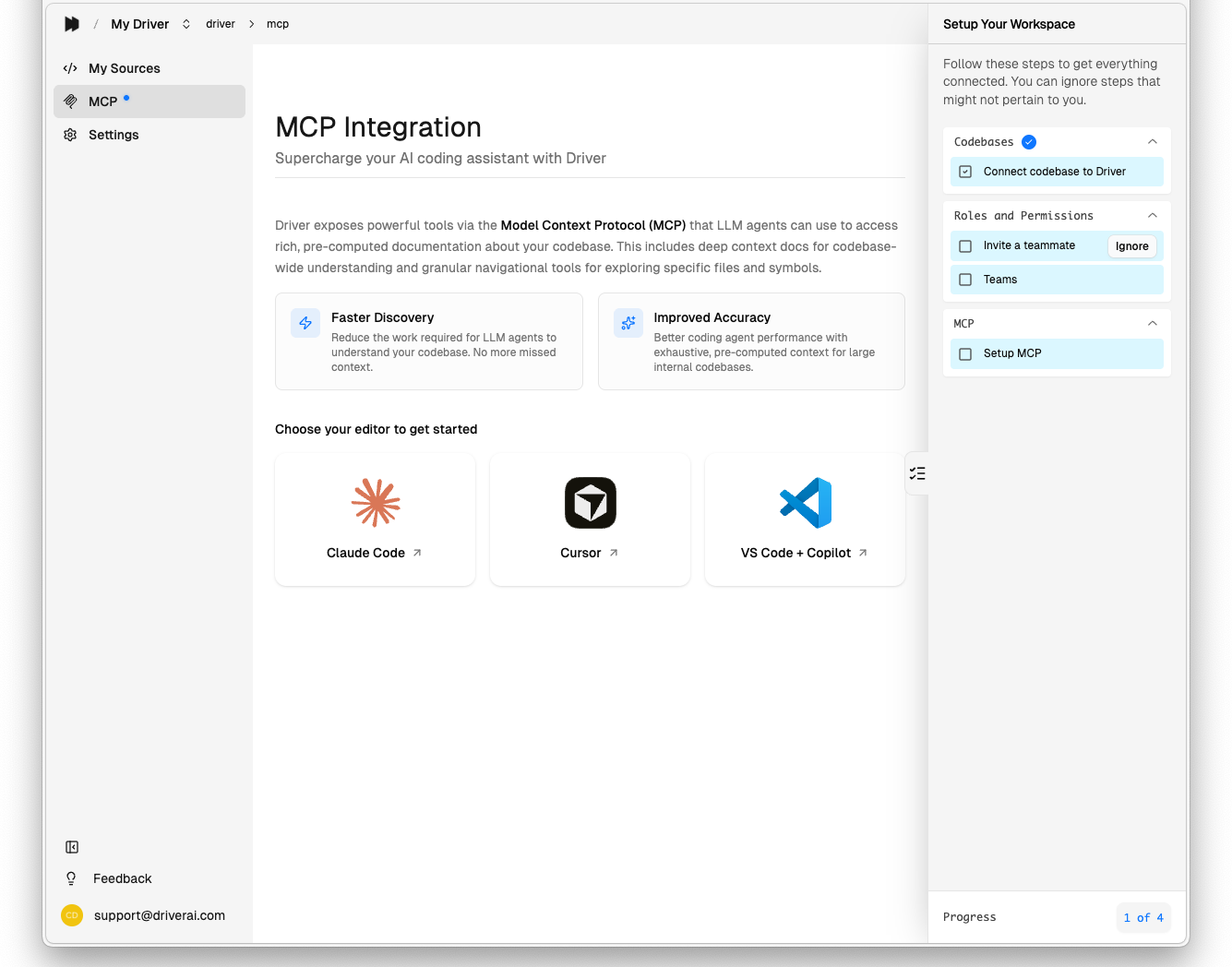
Onboarding Checklist
A new guided setup sidebar helps organization admins quickly configure Driver with progress tracking for each step.
MCP Setup Page
A new dedicated page clarifies exactly how to connect Driver to your favorite AI platform (Claude Code, Cursor, VS Code Copilot, and more), including copy-paste configuration.
Jan 22, 2026
Scaling & Performance
We’ve expanded Driver’s infrastructure to better support growing teams and larger codebases. This release focuses on processing pipeline optimizations for repositories with hundreds of thousands of files, and context generation now runs in parallel across multiple branches.
Jan 8, 2026
Analytics, Single-Tenant Deployments + Scheduled Maintenance
This release brings new visibility into your codebases, simplified authentication, and enterprise-ready deployment options.
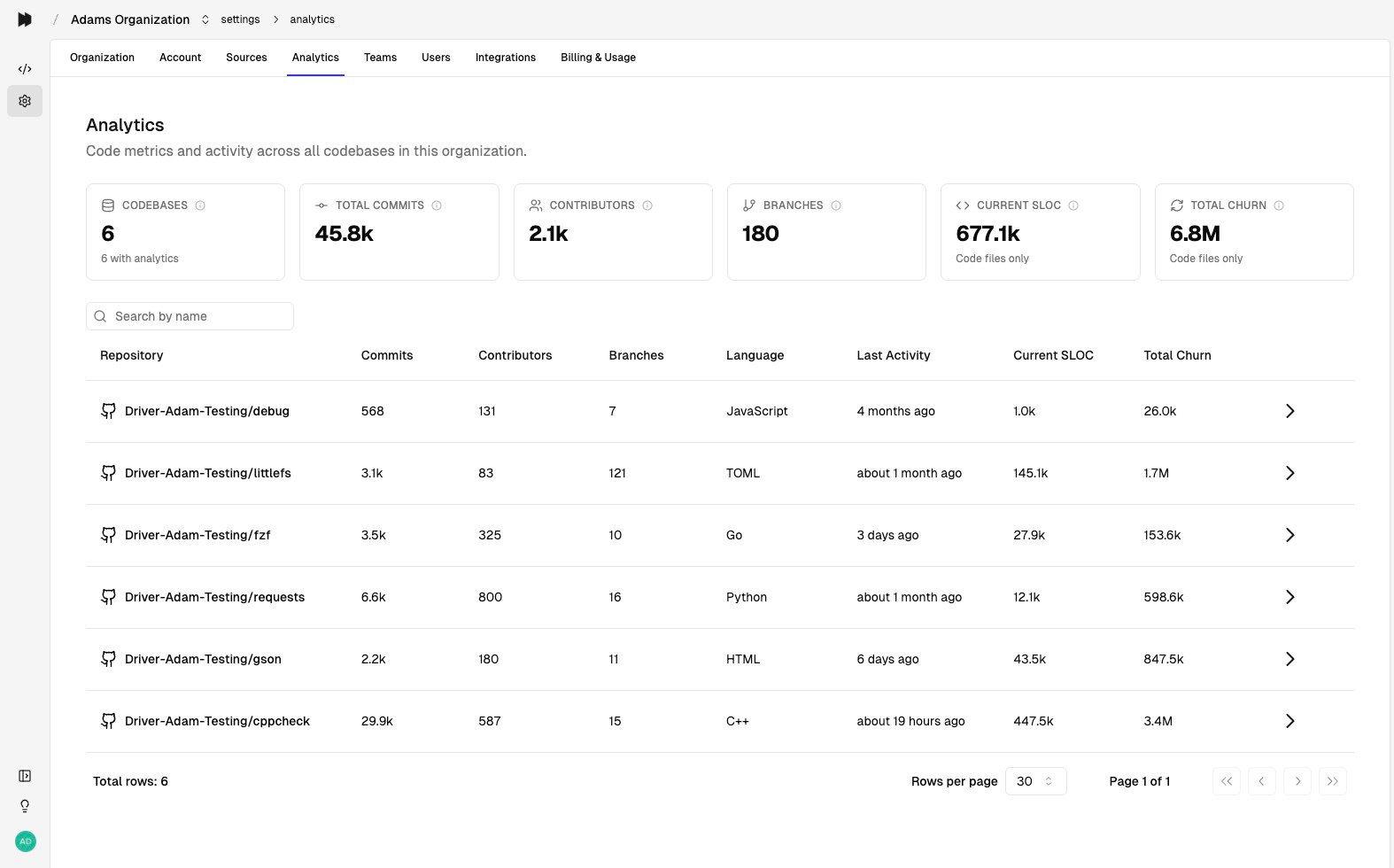
Introducing Analytics
Get visibility into your repositories’ health and activity with Analytics. See commits, contributors, and code changes over time across your organization.
Organization Dashboard
See aggregate metrics across all your codebases in one view: total commits, unique contributors, active repositories, and trend lines.
Codebase Analytics
Dive deeper into individual repositories with detailed views. Track codebase size over time, yearly activity, and contributor patterns.
Branches & Contributors
Track branch health with status indicators (Default, Active, Stale) and see per-branch metrics. View contributor activity, commit frequency, and collaboration patterns.
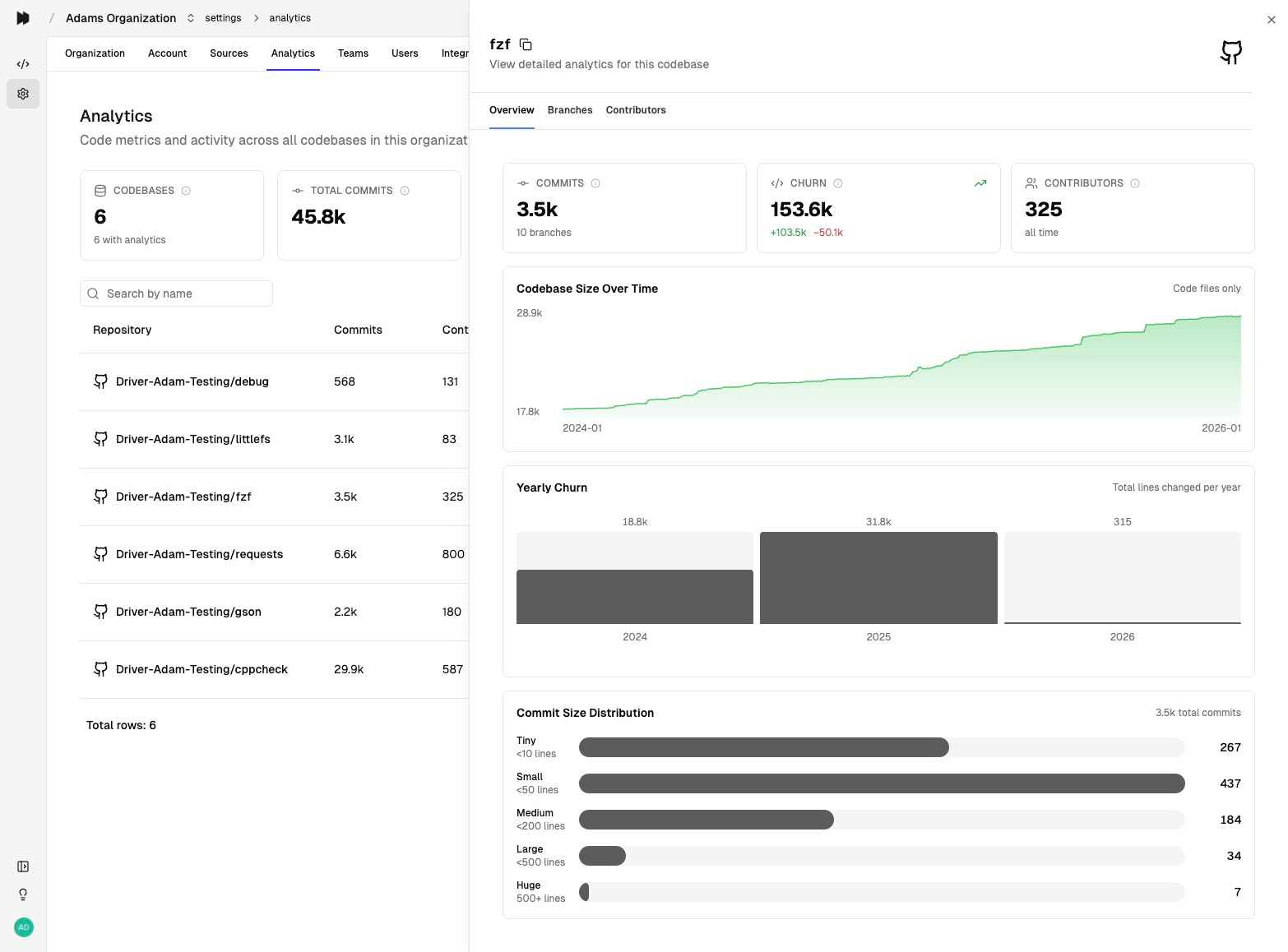
Where to find it: Navigate to Settings → Analytics in your organization.
Single-Tenant Deployments
Private single-tenant deployments are now available for organizations requiring dedicated infrastructure.
Simplified MCP Authentication
You no longer need API keys to use Driver’s MCP tools. Authenticate directly with your Driver account for a streamlined setup experience.
Dec 4, 2025
RBAC Going Live
We are releasing several updates focused on access control, administration, and deployment readiness.
Role-Based Access Control (RBAC)
Users, teams, and roles are now available in Driver, mirroring your internal organization and access controls. Default visibility of sources (codebases and PDFs) can be set, and granular access to specific sources can be granted to teams as well as directly to individual users.
IdP and SCM Integrations Are Next
The initial RBAC solution is designed to provide everything you need to map your access-control policies to Driver. As next steps, the team will be working on SCIM, SSO (via MS Entra ID), and direct mapping from your source-control management system.
Better Onboarding Flow and Management UX
The team is working to make initial onboarding and ongoing administration much easier. This is another area of active investment.
Streamlined Release Infrastructure
Recent release-infrastructure improvements will enable better scaling and faster updates going forward.
Oct 30, 2025
MCP Improvements and Advanced Ruby Specialization
With richer contextual intelligence flowing into Chat, responses are more grounded and context-aware.
Driver Chat now uses the same tools provided by Driver MCP. With richer contextual intelligence flowing into Chat, responses are more grounded and context-aware.
We’ve improved language specialization for Ruby. Ruby moved onto our new language specialization mechanism, yielding improved Ruby docs: better syntax highlighting, more accurate method signatures, and deeper understanding of metaprogramming patterns.
Pagination added to select MCP tools (reliability fix). Some tools now paginate large result sets to prevent overflow edge cases when LLMs invoke them.
The team is working hard on a new RBAC implementation, multi-branch support, and private single tenant deployments.
Oct 2, 2025
Driver Now Supports Go and Azure DevOps
We’ve now expanded language specialization to include Go, and we now support codebase integration with Azure DevOps.
Sep 18, 2025
Precision Autodocs, Deep Context Docs, and Performance Improvements
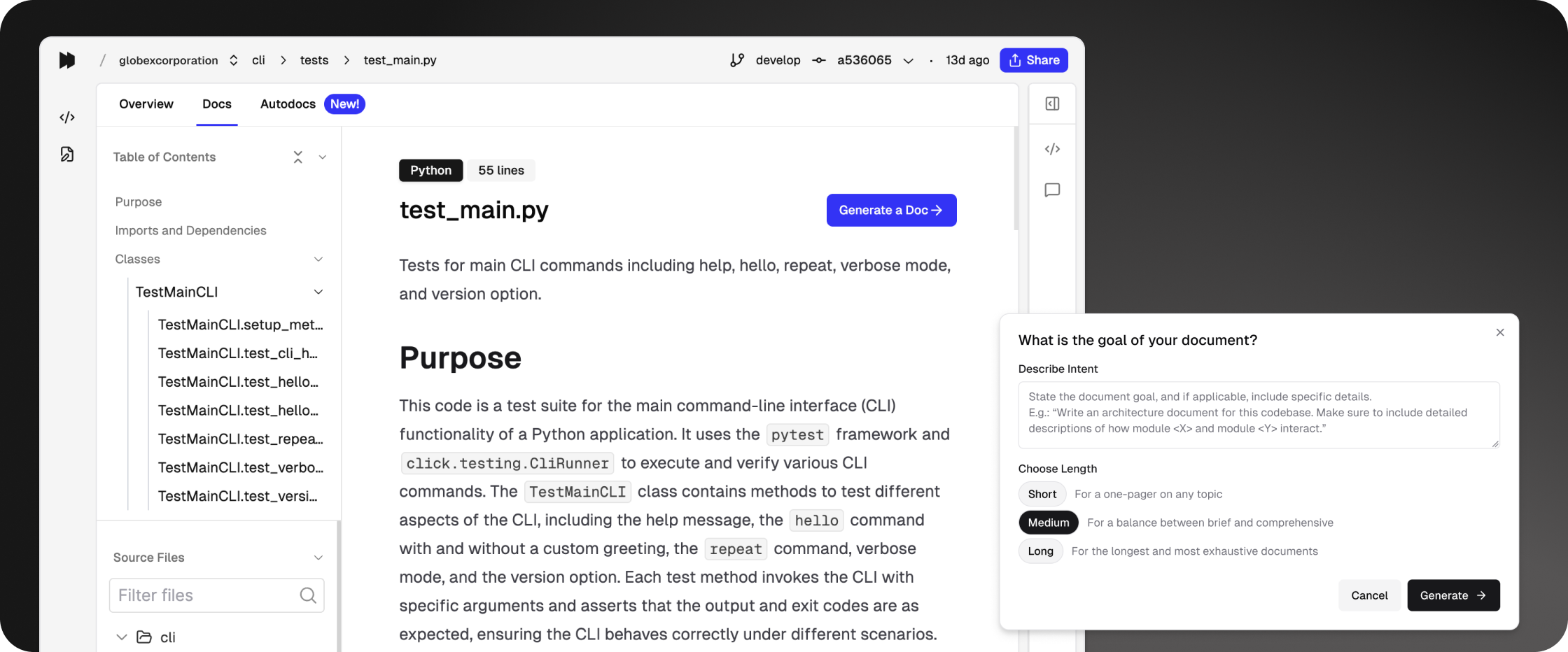
Precision Autodocs
You can now generate autodocs for any folder or file you choose. With a single prompt, create concise, structured documentation exactly where you need it.
Deep Context Docs for Every Codebase
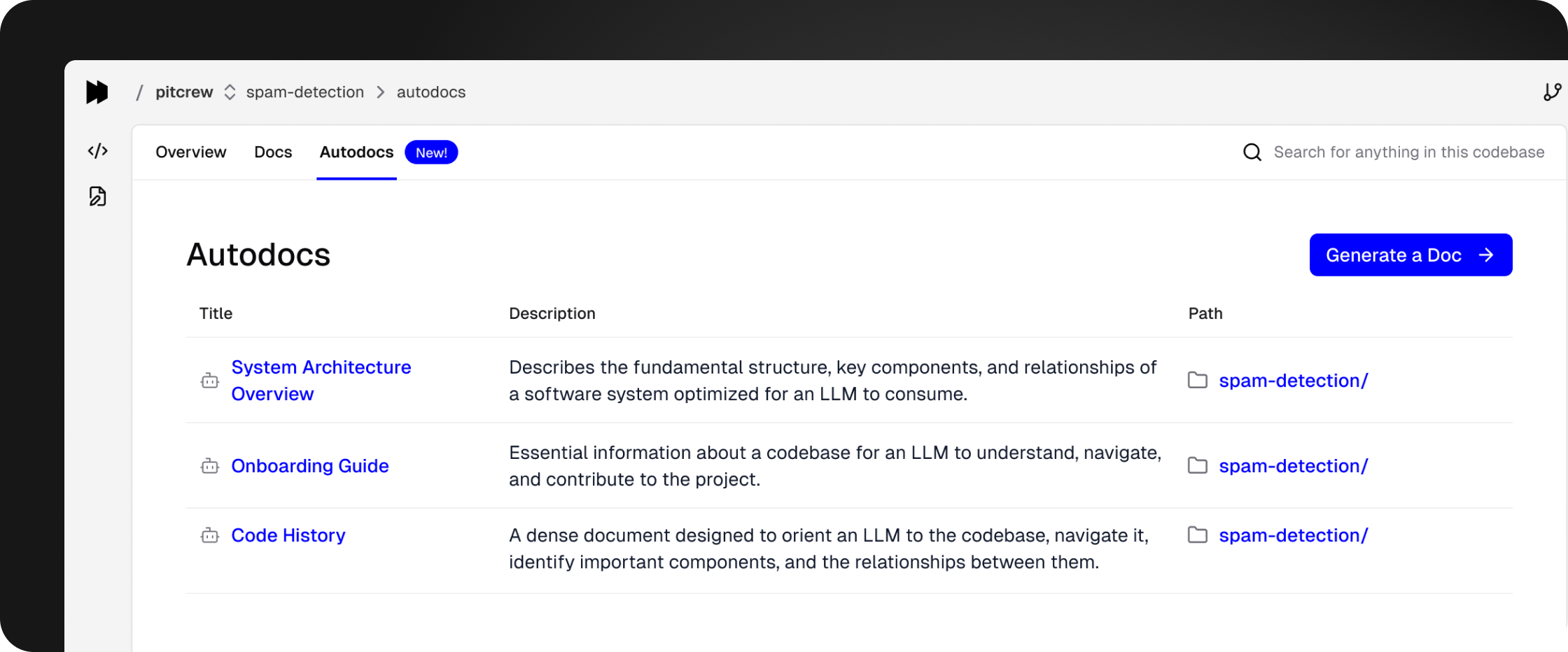
Foundational deep context docs are now available in the new Autodocs tab:
- Architecture Guides – detail the structure of your codebases.
- LLM Onboarding Guides – orient agents to key components, their relationships, and navigation paths.
- Development History Guides – built from commit logs to explain the evolution of your codebases.
Performance and Scalability Improvements
You should notice faster and better results across especially large, complex codebases, such as monorepos and polyglot repositories.
Now any Driver-created pull requests and merge requests will get automatically closed. This change was made based on customer feedback.
We’ve refined our automated commit messages to improve validation compatibility.
Apr 17, 2025
Introducing My Sources and My Documents
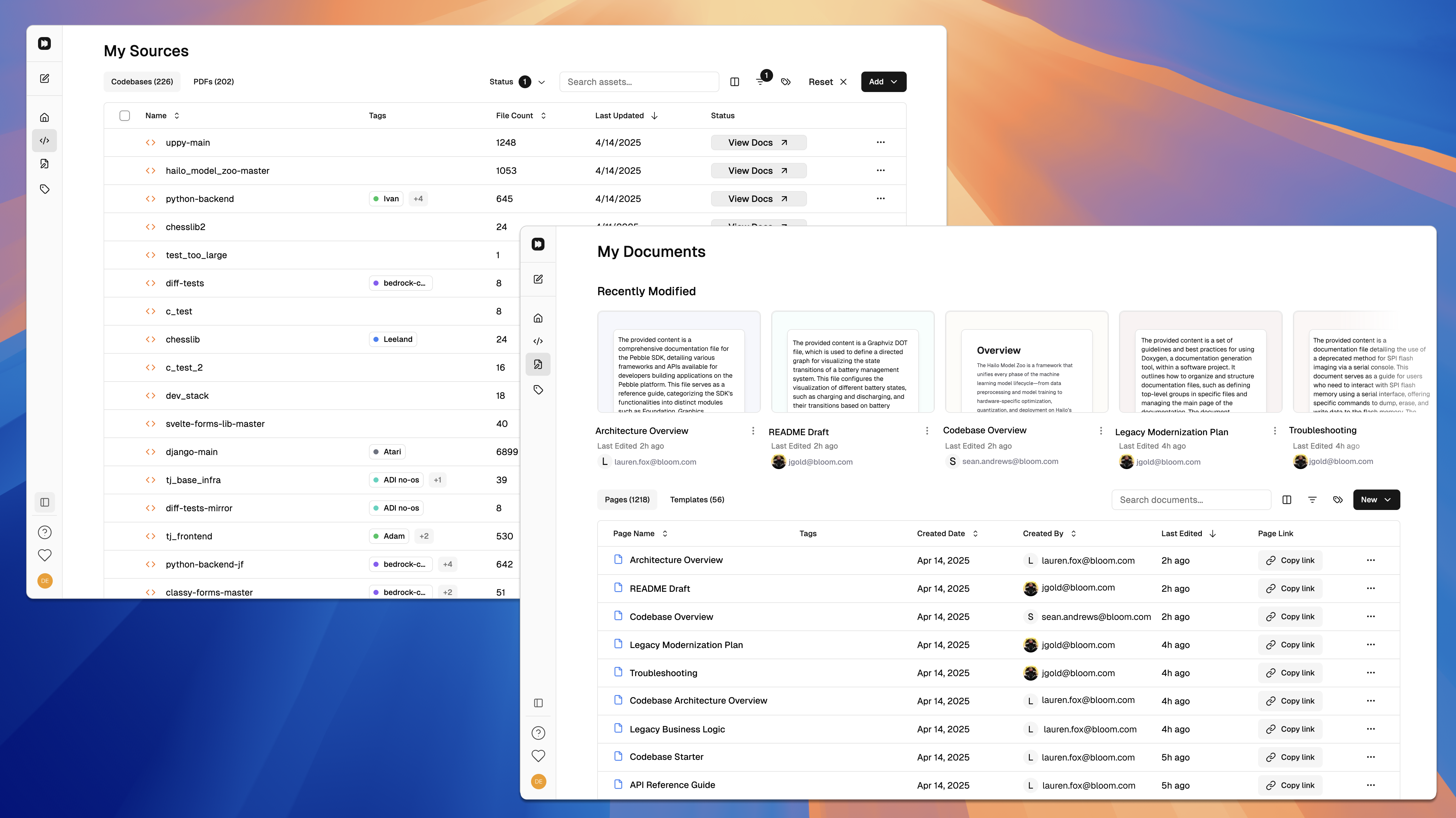
We’ve been listening to your feedback! We’re launching new ways to make it faster and easier to get value from Driver with My Sources and My Documents.
My Sources
A dedicated space for all your team’s codebases and PDFs — organized with a faster and smoother tagging and filtering system.
My Documents
Access all your team’s documents and templates in one place. View the latest activity, tag your documents, and find what you need quickly.
Also, loading time in both product spaces is now much, much faster.
Shift Your Productivity into High Gear
- Find what you need instantly with our improved tagging and filtering system
- Switch between workflows seamlessly with dedicated spaces for inputs and outputs
- Stay organized effortlessly with clearer information hierarchies and metadata
- Save valuable time with fewer clicks to access your most-used content